Working in a workspace
How-tos for developers using workspaces built from a repository's
devcontainer.json. To get started, see Your first
workspace.
Rebuild when the configuration changes
A workspace's image is built once, from the branch on the remote
(origin/<branch>). The Dev Containers for Coder in K8S extension
compares the commit the image was built from with origin/<branch>, over
the files that go into the image:
.devcontainer/and.devcontainer.json;- the Dockerfile and build context
devcontainer.jsonpoints at. If the context is the repository root, every change counts.
It fetches every 5 minutes (devcontainerBuilder.checkIntervalMinutes),
and also checks when you fetch, commit or edit those files. The status bar
shows the result:
| Status bar | Meaning | Click |
|---|---|---|
a1b2c3d |
The image is up to date with the branch's configuration. | Check now |
| Rebuild available | The configuration changed on origin/<branch> since the image was built. The tooltip lists the files, and any you changed here but haven't pushed. If the image's commit is no longer on the remote (force-pushed), it says so instead of listing files. |
Rebuild / Later / Ignore This Commit |
| Push Dev Container changes | You changed the configuration here, but it isn't on origin/<branch> yet, so a rebuild wouldn't include it. |
Source Control view |
| Add Dev Container config | The repository has no devcontainer.json; the workspace runs on a generic image. |
Add configuration (below) |
? |
It couldn't check, e.g. the fetch failed. The tooltip says why. | Check again |
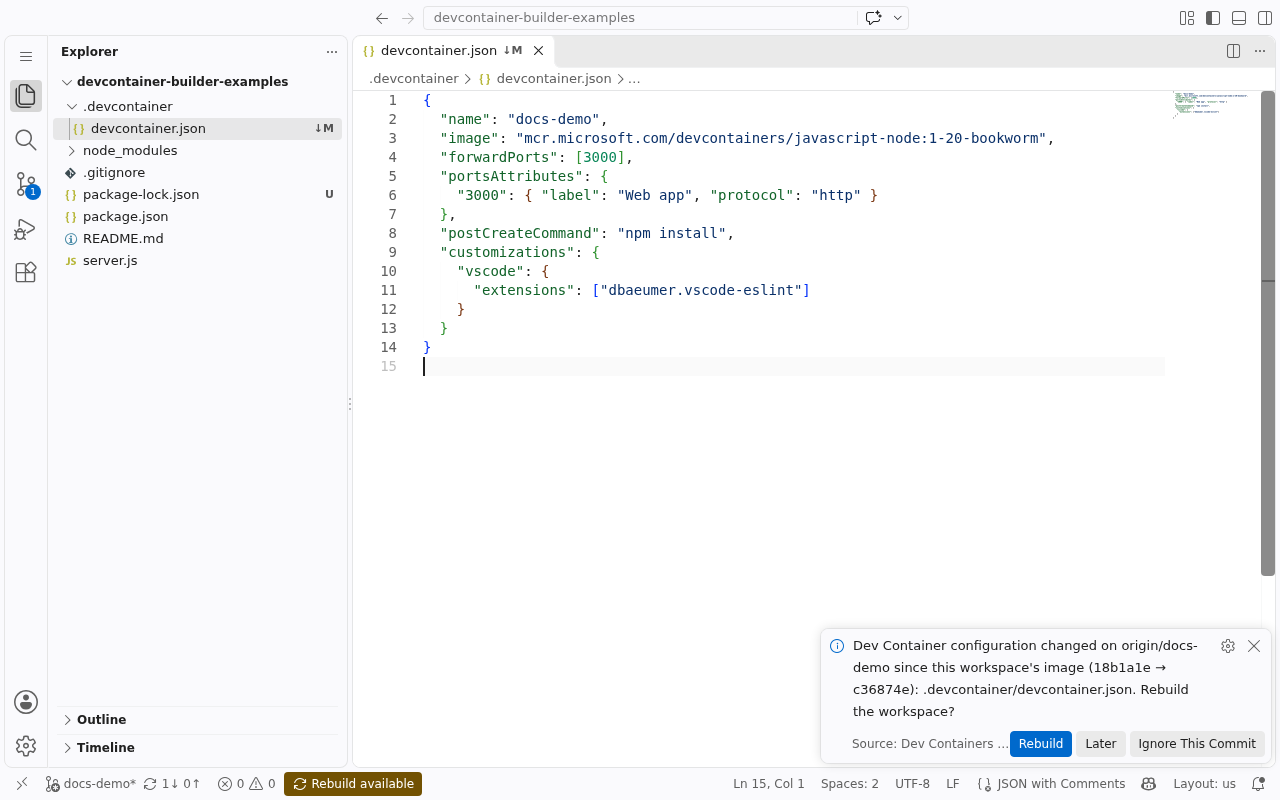
When it becomes Rebuild available, a notification offers:
- Rebuild restarts the workspace on a new image built from
origin/<branch>. Your home and the repository folder, including uncommitted work, are kept. The rest of the filesystem comes from the new image. - Later shows no more notifications until the window reloads.
- Ignore This Commit shows no more notifications until
origin/<branch>moves again.
If you also have Dev Container changes that aren't pushed, the notification says so: a rebuild wouldn't include them, so push them first.
Clicking Rebuild available brings the choices back, and Dev Container: Rebuild Workspace in the Command Palette rebuilds at any time.
One-click Rebuild needs a Coder session in the workspace. Run coder
login <your Coder URL> once in its terminal; the session is kept in your
home. Without it, Rebuild opens the workspace's settings, where you increase
the Rebuild parameter by hand. That works from the dashboard too, with
or without the extension.
Add a configuration to a repository without one
A repository without .devcontainer/devcontainer.json or
.devcontainer.json gets a workspace on a generic image
(mcr.microsoft.com/devcontainers/base:ubuntu by default), and the status
bar shows Add Dev Container config:
- Click it, or Add Configuration in its notification. It runs the Dev
Containers extension's Add Dev Container Configuration Files…:
pick a template, its options and Features. This needs VS Code Desktop with
the Dev Containers extension (
ms-vscode-remote.remote-containers). - Review the files it adds, then commit and push.
- Rebuild available appears. Rebuild.
Dev Container variables
${localEnv:NAME} in devcontainer.json refers to the developer's machine,
which a workspace doesn't have. Values come from the workspace's Dev
Container variables setting instead (Workspace settings → Parameters),
one NAME=value per line, applied on the next restart. If the repository
uses a variable that has no value and no default, the build log and the
dashboard's Dev Container variables item name it.
Values are visible to anyone who can see the workspace's settings, so don't put secrets there that others shouldn't read.
Forwarded ports
Each of forwardPorts becomes an app on the workspace page, labeled from
portsAttributes (http or https), through Coder's proxy. VS Code's own port
forwarding works as usual too.
Size the workspace in Kubernetes terms
hostRequirements only sets minimums: CPU and memory are reserved, and the
limits follow. To set requests and limits separately, ask for GPUs or
ephemeral-storage, or land on dedicated nodes, add
customizations.kubernetes to devcontainer.json:
{
  "image": "mcr.microsoft.com/devcontainers/python:3.12",
  "customizations": {
    "kubernetes": {
      "resources": {
        // Reserve 2 cores and 4 GiB; burst to 6 cores; hard memory limit 8 GiB.
        "requests": { "cpu": "2", "memory": "4Gi", "ephemeral-storage": "5Gi" },
        "limits": { "cpu": "6", "memory": "8Gi", "nvidia.com/gpu": "1" }
      },
      // The workspace volume's minimum size, when the workspace is created.
      "storage": "50Gi",
      // Only honored if the template admin set allow_node_placement.
      "nodeSelector": { "nvidia.com/gpu.present": "true" },
      "tolerations": [
        { "key": "nvidia.com/gpu", "operator": "Exists", "effect": "NoSchedule" }
      ]
    }
  }
}
Commit, push, and rebuild. The dashboard's Resources (reserved / limit)
item then reads CPU 2 / 6 · memory 4Gi / 8Gi · disk 50Gi · ephemeral-storage
5Gi / none · nvidia.com/gpu 1 / 1 · from customizations.kubernetes. Anything the
template changed or ignored is listed in the build log.
- Values are Kubernetes quantities:
"500m","2"or"1.5"for CPU;"512Mi","4Gi"or"1G"for memory and storage. resourcesreplaceshostRequirements.cpus/.memoryas soon as it sets any request or limit. LeavehostRequirementsin for VS Code Dev Containers and Codespaces, which don't read this customization.- Without a CPU or memory limit, the limit is the larger of the request and the workspace's CPU/Memory setting. A limit below its request is raised to the request.
- CPU and memory requests are capped by the template's
max_cpuandmax_memory(default 8 cores, 32 GiB). - GPUs and other extended resources can't be overcommitted, so they're set as limits only (Kubernetes uses the same value as the request).
- A Feature can set defaults. Entries merge in order (base image, Features,
then
devcontainer.json), so the repository's own values win per key, and tolerations from all entries are combined. nodeSelectorandtolerationsneed the template'sallow_node_placement. It's off by default, because taints keep workloads off nodes on purpose. Ask your platform admin. Without it, the build log says they were ignored.
The full rules are in devcontainer.json support and ADR-0015.
What persists
| Kept across restarts and rebuilds | Fresh from the image on every start |
|---|---|
Your home (/home/<user>) |
Everything else: /usr, /opt, … |
/workspaces (the repository) |
Anything installed outside home and /workspaces |
Volume mounts from devcontainer.json |
tmpfs mounts |
On the first start, your home is seeded from the image's home (dotfiles, nvm, oh-my-zsh, …). After that it's yours: rebuilds don't re-seed it.
Lifecycle commands run on every start
onCreateCommand, updateContentCommand, postCreateCommand and
postStartCommand run in that order on every start, before you can
log in; postAttachCommand runs once per start without blocking. In Dev
Containers, the first three run once per container, but here the root
filesystem is fresh on every start. So they must be idempotent, and tools
they install outside your home are best moved into the image or a Feature.
Their output is in the workspace's startup logs.
VS Code
customizations.vscode.extensions are installed from the Microsoft
Marketplace, and customizations.vscode.settings are applied as machine
settings, for both VS Code Desktop and VS Code in the browser. A Desktop
window that connects before that's done picks up the rest after
Developer: Reload Window.
When something goes wrong
- The build failed. The workspace's build log (dashboard → the workspace → the failed build) has devcontainer-builder's error. Coder: Clone Repository in Workspace… offers Show Build Log too.
- A setting from
devcontainer.jsonseems ignored. Anything the workspace can't honor (bind mounts,--network, …) is listed as a warning in the build log and counted in the dashboard's Dev Container warnings item. See devcontainer.json support. - The status bar shows a shield and "Dev Container". The folder isn't trusted (Restricted Mode), and checking runs git in it, so the extension waits. Click it, or Workspaces: Manage Workspace Trust, to trust the folder; checks start straight away.
- The workspace stays Pending. The repository's
hostRequirementsorcustomizations.kubernetesreserve CPU, memory or GPUs, and no node has that much free. The dashboard's Resources item shows what was requested; ask your platform admin.